Smart fallback
When one channel fails, Kero tries the next
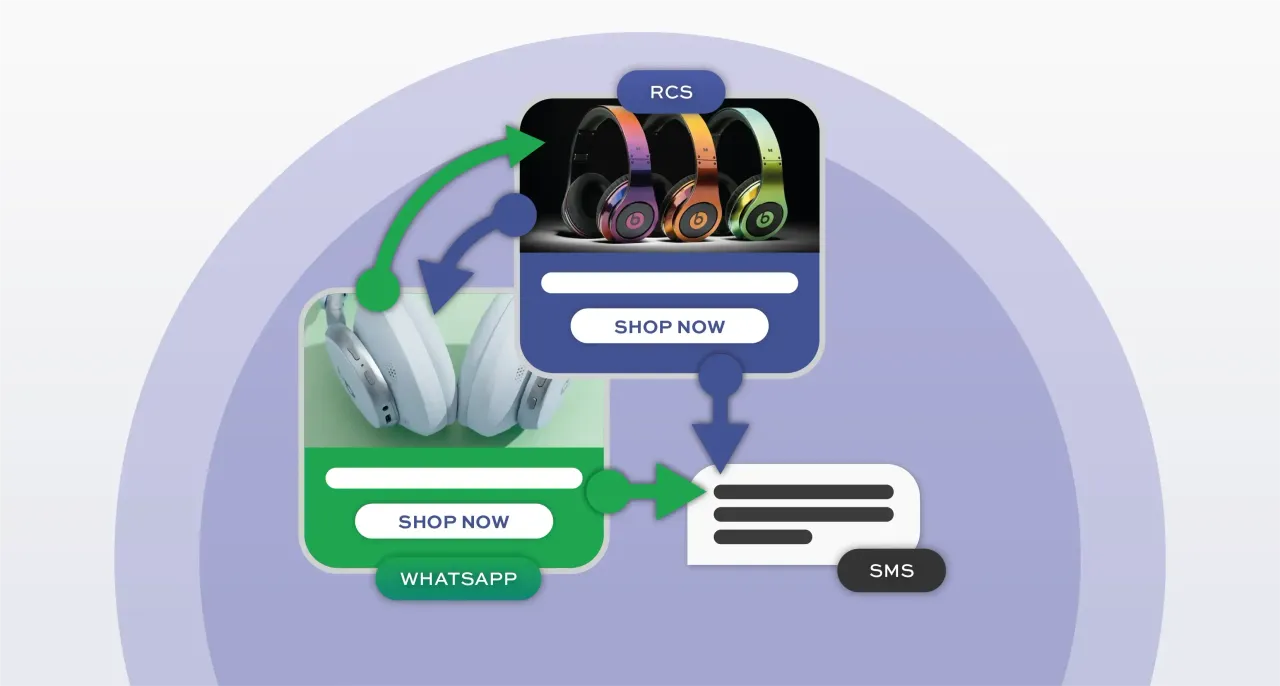
Reach more customers without manually resending messages. Set your preferred channel order in a Kero message template; for example, RCS → WhatsApp → SMS. If a message cannot be delivered or expires, Kero automatically tries the next configured channel. Every attempt is recorded, so you can see which channel delivered your message and where delivery failed.
Includes a 5-day free trial.
What is smart fallback?
Smart fallback allows Kero to try another messaging Agent and channel when a message cannot be delivered through your Primary Agent.
You choose your Primary Agent and configure the order of your Fallback Agents in your message template, for example, RCS → WhatsApp → SMS. If a message fails or expires before delivery, Kero can move to the next configured Agent without you having to resend it manually.
Each sending attempt is tracked separately, so you can see which channel delivered your message, which attempts failed and why.
Smart fallback works across Kero's three messaging channels: RCS, WhatsApp and SMS, helping you reach more customers.
How it works
How Kero moves a message down your fallback chain
From the template you set up to the report you read.
Choose your Primary Agent
Select the Agent you want Kero to try first.
Set your fallback order
In your message template, enable Fallback and add the channel agents in the order you want them attempted.
Kero attempts delivery
Your message is sent using the Primary Agent first.
Fallback happens automatically
If the attempt fails or expires without delivery, Kero can move to the next configured Agent, subject to the applicable sending rules.
Track every attempt
Kero records each sending attempt separately, allowing you to see the outcome of each Agent and channel.
You choose the order. Kero handles the fallback.
You decide which messaging channel Kero tries first and the order of any Fallback Agents. This is configured in your message template and cannot be chosen or changed by the recipient.
To change the fallback order, edit your template, remove the relevant Fallback Agents and add them again in your preferred sequence. The updated order applies to future sends using that template.
For examples of fallback chains businesses use, and when to choose each one, see When one channel fails, Kero doesn't.
Reporting
What you see in Sent Messages
Kero records every sending attempt separately, so you can track a message as it moves through your configured fallback channels.
Each record shows the sending time, recipient, channel agent, message reference, latest update, status and any available failure reason.
When fallback is triggered, you can follow the original attempt and subsequent channel attempts to see whether the message was ultimately delivered.
| Status | What it means |
|---|---|
| delivered | The message was successfully delivered to the recipient's device or messaging service. This does not mean it was read. |
| read | The recipient has read the message, where the channel supports read receipts. |
| failed | The sending attempt was unsuccessful. Check the Reason field for an available explanation. |
| fallback_pending | Kero is attempting to send the message using the next configured agent and channel in the fallback sequence. |
| fallback_sent | Kero successfully initiated the message through the next configured agent and channel. Check the corresponding message record to confirm whether it was delivered. |
Channels
RCS, WhatsApp and SMS compared
How the three channels in a Kero fallback chain differ.
NOTE: Different channels support different message formats. Make sure your message content is suitable for that specific channel in your chain.
| Compared on | RCS | SMS | |
|---|---|---|---|
| What the recipient needs | An RCS-enabled device and supported messaging service, with RCS available on their network | An active WhatsApp account | A mobile number capable of receiving SMS, with network coverage |
| Sender branding | Business name, logo and brand information, verified by Google | Business display name and profile managed through Meta | Sender ID or number, subject to destination-country rules |
| Message content | Text, images, video, rich cards, carousels and suggested actions | Text, images, video, documents and supported interactive features | Text and links |
| Set-up before sending | Business verification, agent approval and launch, including applicable network requirements | WhatsApp Business onboarding, payment setup and Meta-approved templates for business-initiated messages | Sender ID registration or approval where required by the destination |
| Read receipts | Delivery and read receipts where supported | Delivery and read receipts where available | Delivery reports where supported; no read receipts |
| Usual place in a chain | Often the primary channel for rich, branded messaging | Primary or fallback channel for WhatsApp users | Often the final fallback option for broader device compatibility |
Better delivery coverage, not a delivery guarantee
Smart fallback gives your messages another opportunity to reach recipients when the original channel cannot deliver them.
For example, if a recipient cannot receive an RCS message, Kero can attempt to send it through WhatsApp or SMS, depending on your configured Fallback Agents.
However, no messaging channel can guarantee delivery. Invalid numbers, unavailable devices, network restrictions, opt-outs, carrier filtering and messaging provider rules can all prevent a message from reaching its recipient.
Kero improves your delivery options by automatically trying the next configured channel and reporting the outcome of each attempt.
Smart fallback FAQ
Common questions about how Kero routes a message across RCS, WhatsApp and SMS.
Fallback is triggered when a messaging channel reports an error or delivery failure, such as “Number is not RCS enabled”, an unsupported device, or a recipient who cannot be reached on that channel. Kero automatically moves to the next configured agent in your fallback sequence. Fallback can also occur when a message is not delivered within the expiry period set in your message template.
You control how long Kero waits by configuring the Expire setting in your message template. If a message is not delivered before that time, Kero moves to the next configured channel. Some failures, such as an unsupported RCS recipient, can trigger fallback immediately.
No. You choose the primary channel and fallback order when configuring your message template. Kero follows that sequence automatically, and recipients cannot change it.
Any chain you build in the template's Fallback section, by adding one or more agents in the order they should be tried. Common chains are RCS then SMS, RCS then WhatsApp then SMS, WhatsApp then RCS then SMS, and WhatsApp then SMS.
Open Sent Messages or your campaign delivery report. Kero records each sending attempt separately, showing the channel agent, delivery status and any available failure reason. This lets you follow a message through its fallback sequence.
It can. You configure the message content for each channel in your Kero template. For example, an RCS message might include images and buttons, while its SMS fallback contains a shorter text message and a link.
Charges depend on the channel and messaging provider. Some channels charge only for successfully delivered messages, while others may charge for processing or sending attempts. If fallback is triggered, the next channel may incur additional charges according to its pricing rules.
Want help choosing your fallback order?
Our messaging experts can help you pick the right chain for your audience.
Set up your first fallback chain
Start a 5-day free trial and build a template with RCS, WhatsApp and SMS in the order that suits your audience. Want help choosing the order? Book a demo and we'll walk you through it.
Trusted by businesses worldwide